There's a line you hear from web agencies, usually delivered with a sympathetic-but-knowing tone:
"Lighthouse scores don't really reflect real sites. You can't hit all green on a working site — those scores are for static brochures."
It sounds reasonable. It even sounds gracious. Your agency isn't trying to disappoint you; they're managing your expectations against the realities of the modern web. Real sites have video. Real sites have analytics. Real sites have sliders, calendars, embedded forms, image-heavy galleries, third-party widgets. Each one is a tradeoff. Each one costs milliseconds. At some point the cumulative weight makes 100s impossible. That's just physics, isn't it?
It is, and it isn't.
It is physics for the stack the agency is working in. WordPress with Elementor plus a video plugin plus a slider plugin plus Mailchimp for WP plus a forms plugin plus a custom theme that loads twelve CSS files in the head — that stack genuinely cannot deliver all-green on a feature-rich site. The agency is telling you the truth about their tools.
What they aren't telling you — possibly because they don't know, possibly because they don't want to — is that the ceiling they're describing is their stack's ceiling. Not the web's.
What "a real site" actually looks like.
Let me show you what I mean.
This is the homepage of Miabella, a Belfast-based alt-rock band I work with. It is not a brochure. It is an actively trading commercial site running live in production. Here is what loads on the homepage, in order down the page:
A hero section with a placeholder image that swaps to an autoplaying background video. Below that, a custom nine-video player — not a single embed, an actual gallery with nine separate video sources and a custom UI for navigation between them. Below that, a full-width slider showing the band's trajectory: five large images, all hero-sized, swappable on user interaction. Below that, a complete gig calendar with date filtering. Below that, six show cards, each carrying its own hero-quality image. Below that, a blog showcase pulling in the most recent Chronicles articles. Below that, an upcoming events slider. Below that, a Mailchimp signup form. Below that, two separate testimonial sliders. All of this on top of Facebook pixel, Google Analytics, GA4 events, schema.org structured data for events and venue, and a Cloudflare-fronted CDN with image optimisation sitting in front of the whole thing.
You can scroll the homepage yourself if you don't believe me. Every component listed above is on the page, doing its job, every day.
View the live PageSpeed score.
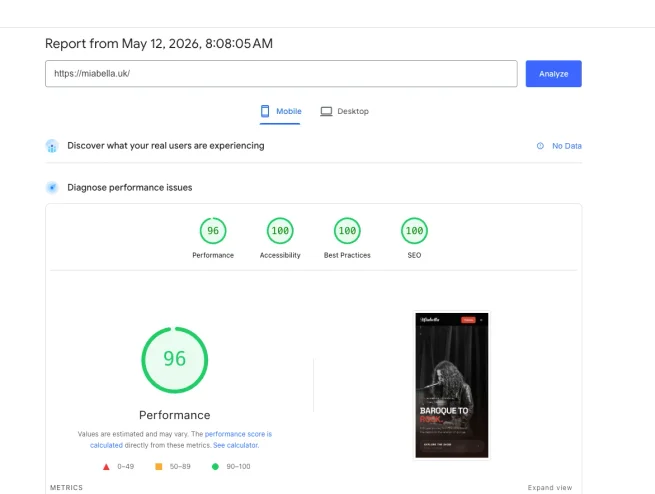
96 Performance. 100 Accessibility. 100 Best Practices. 100 SEO. On mobile, which is the surface where it is hardest to hit those numbers.
Not a brochure. Not a static one-pager. A working site with more dynamic content than most agency-built ecommerce stores, hitting all green on the surface where the cope is loudest.
Why the myth is believable.
The myth exists because it is almost true.
If you build a feature-rich site on the dominant CMS stack of the last fifteen years, you cannot hit these scores. WordPress core renders PHP on every request. The theme framework loads its own CSS and JS whether or not the current page uses them. Page builders like Elementor, Divi, and WPBakery inject their own runtime layer on top of that. Each plugin adds its own CSS file, often loaded sitewide rather than only where it is actually used. A slider plugin pulls in its own JS bundle. A video plugin pulls in its own embed loader. A forms plugin loads its scripts in case the form is present anywhere on the page. Analytics, marketing pixels, and chat widgets get piled on by marketing teams over the years and never removed. By the time the browser has parsed all of this, the first contentful paint is already gone and the cumulative layout shift is already locked in.
None of these accretions happened on purpose. Each of them came in as a single "just" — just a slider, just a tracking script, just a custom font — and nobody costed the cumulative bill at the point of any individual decision. That bill is what Lighthouse is now measuring. The score is not the cause of the problem; it is the receipt.
This is not a controversial claim within the web development community. It is accepted. The argument is over what to do about it. The mainstream answer is "manage expectations, settle for yellow, blame Google for unrealistic benchmarks." The minority answer is "the problem isn't the benchmarks, it's the stack."
I am in the minority. I think the benchmarks are fine. The stack is the problem.
What this site is actually doing differently.
Miabella's homepage works because the architecture is built around what the browser actually has to do.
There is no framework runtime parsing on first paint. The page is static HTML, generated at build time from a JSX source. The browser receives the rendered page directly. There is no React runtime initialising, no Vue hydration step, no PHP execution waiting on a database round trip. The HTML the browser receives is the HTML the user sees.
Image responsive sets are generated at build time. Every image on the page has multiple sizes and formats produced at deployment, and the browser picks the right one based on the viewport. The hero image served to a phone is not the same file as the one served to a desktop, and neither of them is the original full-resolution upload that the editor dropped in.
Components that are not viewport-visible do not initialise until they need to. The nine-video player below the fold does not construct its DOM until the user scrolls toward it. The two testimonial sliders do not set up their carousel logic on page load — they wait. This is normal practice in custom-built sites and almost impossible to enforce in plugin-driven CMS sites, because each plugin assumes it owns the page.
There is no CSS framework cascading over CSS framework cascading over CSS framework. There is one stylesheet, generated from one source, applying to one site. No Bootstrap layered over Tailwind layered over Elementor defaults layered over the theme's overrides.
There are no plugins. There is no plugin layer. Every piece of functionality on the page is built in the codebase by the person responsible for the codebase. When something needs to change, the change is made in one place. When something needs to be removed, it is actually removed — not deactivated and left dormant in the database with its assets still loading on every page request.
This is not unusual. It is how the web worked before we collectively decided that every site needed a CMS and every CMS needed plugins. The skill of building this way has not disappeared. It has just been overshadowed by tooling that promised to make web development accessible at the cost of making it slow.
You can see the principle even more clearly on sites that never needed a CMS to begin with — a working musician's six-page brochure, say, where the database isn't holding meaningful content and the plugin layer isn't doing meaningful work. The Miabella homepage above is the maximalist version of the argument: every component you can think of, all green on mobile. The musician's brochure is the minimalist version: nothing complicated to begin with, so why pay for the overhead of a stack designed for complexity? Same architectural answer at both ends of the scale.
Hosting will not save you.
I want to address one specific cope I hear regularly, because I am in an unusual position to address it.
When a site is slow and the client raises it with the agency, the agency frequently blames hosting. "Your hosting is shared, you need managed WordPress hosting at £40 a month and that'll fix it." Sometimes that is a true diagnosis. Most of the time it is not.
I also own a hosting company. I have a commercial incentive to tell you hosting matters. I am telling you it does not, in the way the agency means.
Faster hosting can shave milliseconds off PHP execution time. It can give you more RAM for your database. It can put you in a closer datacentre. None of this fixes the underlying problem, which is that the page is sending too much code to the browser, too late, in the wrong order. Hosting affects the millisecond between the browser asking for the page and the server beginning to respond. Architecture affects everything after that — and everything after that is where Lighthouse scores live.
You can put a WordPress site on the fastest hosting on earth and it will still ship 800kB of render-blocking JavaScript to the browser. The browser will still have to parse it. The user will still wait. The Lighthouse score will still be red or yellow.
The corollary, and the reason I am comfortable telling you this against my own commercial interest: a properly architected static site runs perfectly well on a $5 VPS. Miabella's site (annually) is hosted on infrastructure that costs less than a single month of "managed WordPress hosting" and outperforms every site I have seen on that hosting category. The constraint was never the hardware.
What this means for your site.
If your agency is telling you that all-green Lighthouse is not realistic on a working site, two things are true at once. The first is that they are telling you the truth about what their stack can achieve. The second is that they are describing the ceiling of their tools as if it were the ceiling of the web. It is not.
The real question, if you are paying for a site that has to perform, is what stack you are on — not what optimisations can be applied inside it. The optimisation path inside WordPress runs out quickly. The optimisation path inside a properly built static site has barely been started before you are already at 100.
I am building an audit tool that will tell you, for any URL you give it, where the performance ceiling actually is on your current stack — and how much of the gap between your current scores and all-green is recoverable without changing the stack, versus how much of it requires a rebuild. It is not live yet. If you want to be notified when it is, drop me a line at hello@web9.co.uk.
In the meantime, run Lighthouse on your own site. Look at the numbers. Ask your agency what the path to 100 looks like. Listen carefully to the answer. If the answer is some version of "that is not realistic for a real site," you now know what they actually mean.
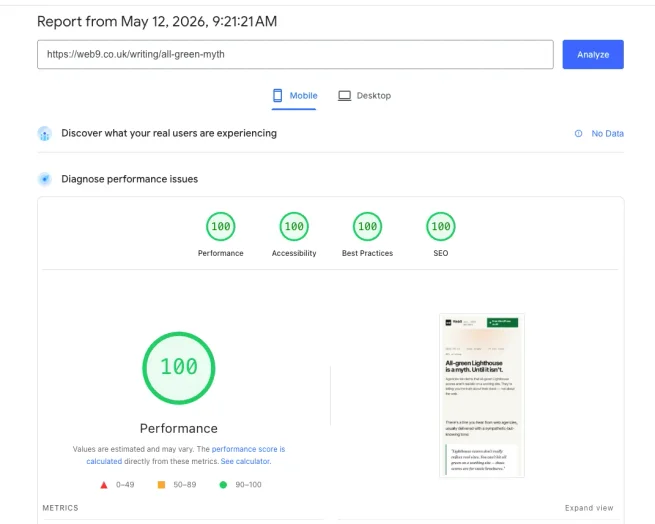
PS: You can view the PageSpeed Insights for this article yourself. The screenshot above is the result.