The before / after, on the same machine, minutes apart.
The two screenshots below are PageSpeed Insights runs against the live WordPress site and the rebuilt static version, captured within a single minute of each other on the same Lighthouse engine. Same content. Same brand. Same photos. Different stack.
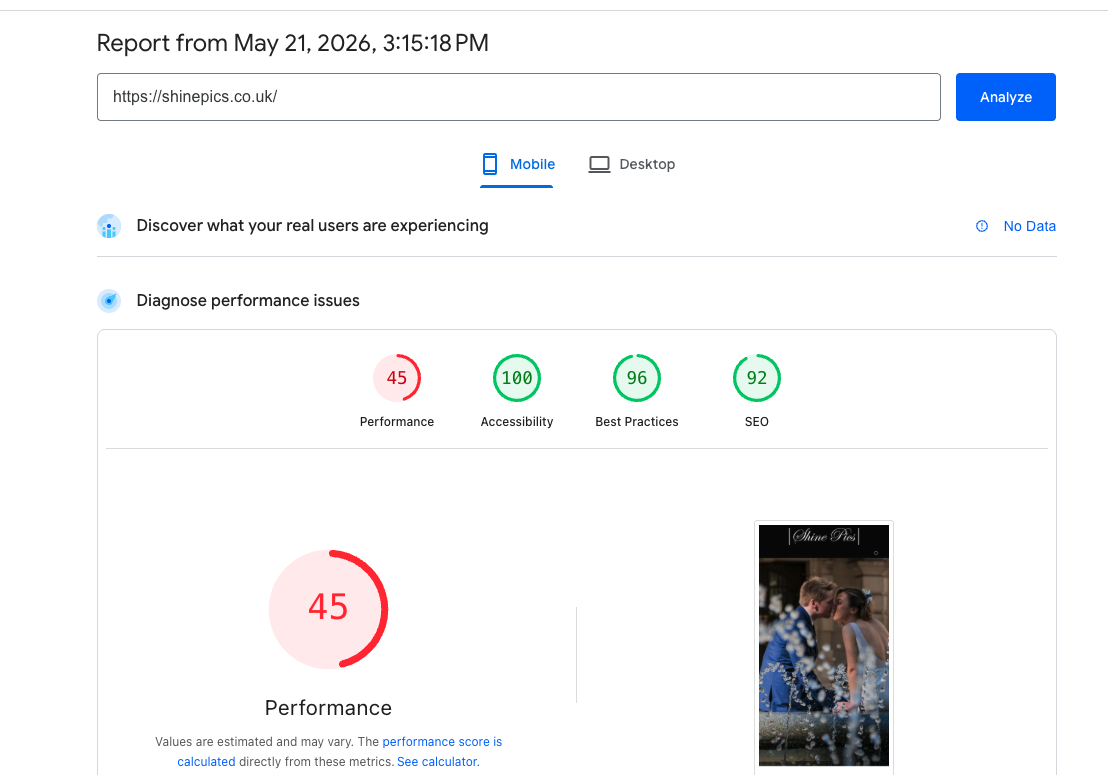
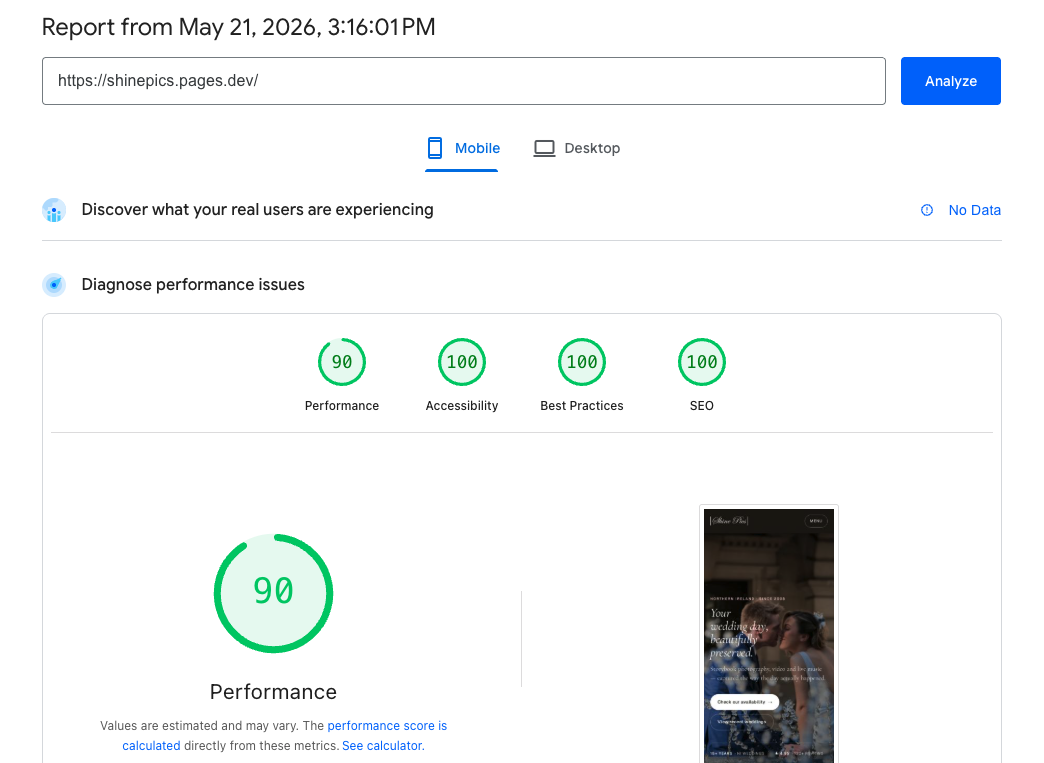
The Performance lift is the headline number — almost exactly double — but the three other panels going to 100 is what closes the door on the entire category of agency excuse that says all-green isn't realistic on a working site. It is. We did it with the same photos and the same words.
Nine steps, in the order they happen.
The procedure below is how we do every WordPress extraction. The order matters: ship an empty framework first, then put content into it, then iterate to score — not the other way around. Building content on top of bloat then trying to optimise the bloat away is the trap most rebuilds fall into.
-
Export every page and post as JSON.
Pull the canonical content out of WordPress as structured data — titles, body copy, image references, dates, categories — not as rendered HTML. Once it's JSON, the source of truth is portable and the rest of the rebuild can treat WordPress as a one-time data dump.
-
Strip the WordPress bloat, nested CSS, and Elementor div soup.
Page-builder output is the single biggest reason these sites score 45 on Performance. Forty-deep div nesting, six layers of inline-style overrides, megabytes of CSS where dozens of kilobytes would do. The rendered HTML gets reduced to the actual semantic content — headings, paragraphs, lists, images — and everything else is dropped.
-
Build a clean framework: header, footer, empty body.
The chrome (nav, footer, base styles, head metadata) is built as reusable HTML partials with nothing in the body yet. This is the architectural shell — small, fast, accessible — that the content will eventually drop into.
-
Ship the empty framework. Test it with no content.
Deploy the shell to a staging URL before any content lands. Run Lighthouse against it. If the empty framework doesn't already score 100 across the board, the framework is wrong — fix it now, before any content is on top of it to obscure the diagnosis.
-
Build the brand identity — fonts, colours, max font sizes.
Pick the typeface(s), define the colour tokens, set the type scale ceiling. Doing this as a discrete step — rather than letting it drift in via page-by-page decisions — is what keeps the system coherent and the font payload small. One pass, written down, then applied.
-
Build a single test page with real content.
One representative page, not the homepage. Take a real article or service description from the JSON export and lay it out using the brand identity. This is the first time content meets the framework — the test page exposes anything the empty-framework Lighthouse run couldn't see.
-
Test the test page. Real device, real network throttling.
PSI mobile, real-device check, accessibility tree review, screen-reader pass. The test page is the canary — if anything is going to fail at scale, it fails here first, in isolation, where the fix is cheap.
-
Tweak until SEO, Accessibility and Best Practices are 100 each.
Those three panels are non-negotiable. Performance is allowed to vary slightly with content weight (a gallery-heavy page genuinely is heavier than a text page), but the other three are pass/fail and the only acceptable mark is 100. Iterate the test page until it's there.
-
Cull. Audit every weight on the page.
Do we really need the font at 700 when we already have the same family at 800? Is every font local, or are we still calling Google Fonts? Are we loading a JavaScript library for one feature we could implement in ten lines? Every byte is justified or removed. The case for keeping anything has to be made — the default is to drop it.
Two pieces in Writing argue the principle this build demonstrates.
The Shinepics rebuild is a worked example of two arguments we've already made in long form. The before/after is the proof; these are the why.
The unseen consequence of every website decision.
Fast websites become slow one decision at a time. Every plugin added, every page builder enabled, every "just one more" feature is a Performance score point you'll later have to recover. Shinepics-before is what that drift looks like at the end. Shinepics-after is what shipping with the discipline looks like at the start.
Read the piece → Case study · ~9 min readAll-green Lighthouse is a myth. Until it isn't.
Agencies tell clients all-green isn't realistic on a working site. They're describing their stack, not the web. Shinepics is the second site in a row where the rebuilt static version hits 100 on Accessibility, Best Practices and SEO with no asterisk — because the framework was built to those numbers before any content was on it.
Read the piece →Four more layers, all in flight.
The nine-step process above is the rebuild. The four items below are everything that happens around the rebuild — keyword discipline going in, pre-deploy verification, post-deploy observability, and adversarial stress testing. Each one is a piece of operational kit we run for ourselves; each one will get its own write-up as it stabilises.
How we decide what keywords to include.
The discipline that runs before a single page is written. Which queries we're actually trying to win, which we deliberately won't pursue, and why most "SEO keyword research" outputs are noise.
How we confirm a page is ready before it goes live.
The checklist that runs against every page before it ships — Lighthouse thresholds, accessibility-tree review, schema validity, link integrity, payload audit. Pass the gate or the commit is rejected.
What we do after it's live.
Watching which bots crawl what, how often, and from where. AI-grounding traffic looks different from search-engine traffic, and treating them as the same line in a log is how you miss the change.
How we stress the site adversarially.
Deliberately try to break the things we just built — prompt-injection against schema, broken-state rendering, hostile referrer chains, malformed bot requests. If we don't find the failure modes, an attacker (or a misbehaving crawler) will.
Each of those four becomes a writeup of its own once we're confident the practice is replicable rather than situational. The Shinepics case study will be updated with results from each as the data lands.